Best AI Tools for Turning Written Ideas Into Videos
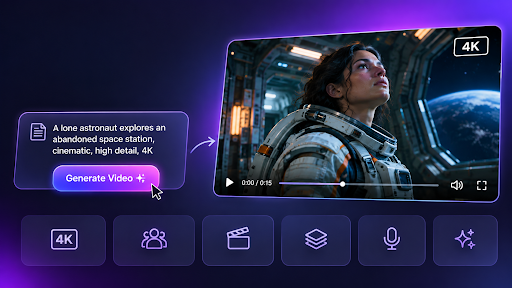
AI tools for turning written ideas into videos help creators transform text prompts, scripts, articles, and creative briefs into visual content. These tools can generate scenes, add voiceovers, create subtitles, and arrange footage based on written instructions.
Creating a video traditionally involves several steps, including scripting, filming, collecting footage, editing, and adding sound. AI video tools make parts of this process easier by allowing creators to start with a written idea rather than building everything manually.
A filmmaker can turn a scene description into a cinematic clip, while a marketer can convert a product description into a promotional video. Educators can also turn lesson notes into visual explanations that are easier for students to follow.
However, different AI video tools serve different purposes. Some specialize in AI filmmaking and generating original scenes, while others focus on repurposing written content, creating narrated videos, or producing marketing content.
This article explores six AI tools for turning written ideas into videos, covering their main capabilities and practical applications.
How We Selected the Best AI Text-to-Video Tools
We selected these tools based on how effectively they turn written content into videos and how well they support different creative needs.
The comparison focuses on four important factors:
- Text-to-video creation: Whether the platform accepts prompts, scripts, articles, or documents.
- Visual generation: Whether it creates original scenes or arranges existing video footage and images.
- Editing flexibility: How easily creators can change scenes, visuals, narration, and timing.
- Practical applications: Whether the tool supports filmmaking, marketing, education, or social media content.
Each platform offers a different approach to video creation, making it useful for a particular type of user or project.
Quick Comparison of the Best AI Tools for Turning Text Into Videos
| Tool | Best for | Main capability |
| Invideo Agent | Creating complete videos from written ideas | AI-generated scenes, audio, and editing |
| Pictory | Turning articles and scripts into videos | Article-to-video and script-to-video creation |
| Fliki | Creating narrated videos | AI voiceovers and automated scene creation |
| VEED | Creating social media and marketing videos | AI video generation and browser-based editing |
| Synthesia | Creating presenter-led videos | AI avatars and multilingual narration |
| Canva | Creating branded videos | AI-generated clips, templates, and design tools |
1. Invideo Agent
Invideo Agent is an AI filmmaking platform that helps creators turn written concepts, scripts, and creative briefs into videos. It combines AI video generation, scene planning, voiceovers, background music, and editing in a connected creative workflow.
Creators can describe the setting, characters, camera angles, lighting, and visual style they want. The platform interprets these instructions and generates scenes that follow the intended creative direction.
With Invideo Agent, creators can turn text into videos with AI using models such as Seedance 2.5, Kling, and Veo 3.1. They can generate videos in up to 4K resolution with hyper-realistic human characters, cinematic effects, animations, voiceovers, and more, all from a simple text prompt. This makes it useful for creating cinematic scenes, product advertisements, animated stories, and social media videos without traditional filming.
Beyond generating individual clips, Invideo Agent supports longer video projects by turning scripts and briefs into storyboards, organizing scenes, and preparing an editable timeline. Creators can review the generated content, adjust visual details, and refine the final video before exporting.
2. Pictory
Pictory is an AI video creation platform that helps creators convert existing written content into videos. It is particularly useful for bloggers, marketers, and businesses that want to repurpose articles, scripts, and educational resources.
The platform analyzes the supplied text and organizes it into video scenes. It can suggest visuals, add narration, and include captions to support the message.
Users can start with a blog article, webpage, or written script and create a video without recording every scene themselves. The platform also provides stock footage and images that can be matched with the written content.
Pictory also allows creators to review and adjust their videos, making it easier to replace visuals or refine the presentation before publishing.

3. Fliki
Fliki is an AI video creation platform that combines written content with AI-generated narration, visual media, and subtitles. It is designed for creators who want to produce videos without recording voiceovers or filming original footage.
The platform accepts scripts, blog posts, and written ideas, then helps convert them into videos with spoken narration and supporting visuals.
One of Fliki’s main capabilities is its selection of AI voices across different languages. Creators can choose a voice that matches the intended audience and adjust the narration to suit the content.
Fliki also supports videos for social media, educational platforms, and business communication. Creators can review the generated scenes and replace visuals or adjust narration when needed.

4. VEED
VEED is a browser-based video creation and editing platform that combines AI generation with traditional editing tools. It helps creators turn written ideas, scripts, and marketing messages into videos.
The platform supports text-based video generation, allowing users to describe the visuals they want and generate clips inside the editor. Its Gen-AI Studio also supports creating short videos from scripts or prompts using narration and matching media.
VEED also provides tools for adding subtitles, changing video dimensions, adjusting audio, and preparing content for different platforms.
This makes the platform useful for social media managers and marketing teams that need to create and edit videos regularly.
Rather than relying only on AI generation, creators can combine generated clips with existing footage and make further adjustments within the editing workspace.
5. Synthesia
Synthesia is an AI video creation platform that turns written scripts, documents, and presentation materials into videos featuring digital presenters.
Instead of filming someone speaking in front of a camera, creators can select an AI avatar and provide a script. The platform generates a video in which the virtual presenter delivers the written content.
Synthesia is commonly used for employee training, educational content, onboarding, and internal business communication.
The platform also supports videos in different languages, making it useful for organizations with employees or customers across multiple regions.
Creators can update scripts and supporting visuals when information changes, which is helpful for training materials that need regular revisions.
6. Canva
Canva is an online design platform that combines video editing, templates, and AI-powered content creation. It helps businesses, marketers, and creators turn simple written ideas into visually consistent content.
The platform includes AI video generation tools that can create short clips from text prompts. Users can then bring the generated footage into Canva’s video editor to add graphics, animations, music, and other elements.
The platform also offers a large collection of templates for promotional videos, social media posts, educational content, and business announcements.
Canva is especially useful for creators who already manage their visual content within the platform and want videos that follow the same branding.
Its design tools allow users to combine generated scenes with existing images and other visual assets to create a complete video.

How to Choose the Right AI Tool for Turning Text Into Videos
Choosing an AI video tool depends on the written material you have and the type of video you want to create.
1. Identify the Type of Content You Want to Convert
Different tools support different starting points.
A short creative prompt may work well with a generative AI filmmaking platform, while an existing article may be better suited to a content repurposing tool.
If you have a complete script, look for a platform that can organize the script into scenes and add appropriate visuals.
2. Decide Whether You Need Original or Existing Footage
Some AI video tools generate new scenes based on written descriptions. Others build videos from stock footage, images, and templates.
Original generation is useful for fictional storytelling and creative concepts that are difficult to film.
Stock-based creation can be practical for tutorials, informational videos, and content that explains existing ideas.
3. Consider the Importance of Narration
If your video relies heavily on spoken explanations, choose a tool with suitable AI voiceover options.
Educational videos, training materials, and informational content often need clear narration to help viewers understand the subject.
For visual storytelling projects, scene composition, movement, and editing controls may be more important.
4. Check the Available Editing Options
AI-generated videos often need changes before publishing.
Look for tools that let you replace scenes, adjust timing, modify narration, and change visual elements.
For AI filmmaking projects, the ability to refine individual shots and maintain consistency between scenes can be particularly useful.
5. Match the Tool to Your Publishing Platform
Different platforms require different video formats.
YouTube videos commonly use horizontal layouts, while TikTok, Instagram Reels, and YouTube Shorts are designed around vertical content.
Choose a tool that supports the formats and export options needed for your intended audience.
Frequently Asked Questions
What are the best AI tools for turning written ideas into videos?
Invideo Agent, Pictory, Fliki, VEED, Synthesia, and Canva are useful for different text-to-video workflows. Invideo Agent focuses on creating videos from prompts and scripts, while Pictory and Fliki support written content repurposing. VEED, Synthesia, and Canva serve social media, training, and design-focused needs.
Can AI turn a written story into a video?
Yes. AI video generation tools can create visual scenes from written stories, scripts, and prompts. Creators can describe characters, settings, actions, and visual styles, then review the generated clips and refine the results.
Which AI tools can convert blog posts into videos?
Pictory and Fliki support turning blog posts and other written content into videos. They can organize text into scenes, add matching visuals, and include narration or subtitles.
Can AI create videos without filming?
Yes. AI video tools can create videos without traditional filming. Some generate original scenes from text prompts, while others assemble stock footage, illustrations, animations, or digital presenters into finished videos.
Are text-to-video AI tools suitable for beginners?
Many text-to-video tools are designed for users without professional editing experience. Prompt-based generation, ready-made templates, AI narration, and automatic scene creation make video production more accessible. However, creators should still review generated content for visual quality and accuracy.
Can AI-generated videos be used for marketing?
Yes. AI-generated videos can support product promotions, social media campaigns, explainers, and other marketing projects. Businesses should check commercial-use terms and review the content for brand accuracy before publishing.
Conclusion
AI tools are changing how creators turn written ideas into videos. Instead of beginning every project with filming or manual editing, users can start with a prompt, script, or existing article and develop visual content from that material.
Invideo Agent supports original scene generation and AI filmmaking workflows, while Pictory and Fliki focus on transforming written content into narrated videos. VEED provides social media editing tools, Synthesia supports presenter-led communication, and Canva helps create branded video content.
Each platform has a different purpose, so choosing the right one depends on your creative goals and the type of written material you want to convert.

Ehtisham Ahmad, the mind behind techspicies.com, is passionate about technology, innovations and SEO-driven content that empowers readers to stay ahead in the digital world.
Founder & CEO
Ehtisham Ahmad, the mind behind techspicies.com, is passionate about technology, innovations and SEO-driven content that empowers readers to stay ahead in the digital world.